How to Design an App: A Complete Guide to Create and Build Apps
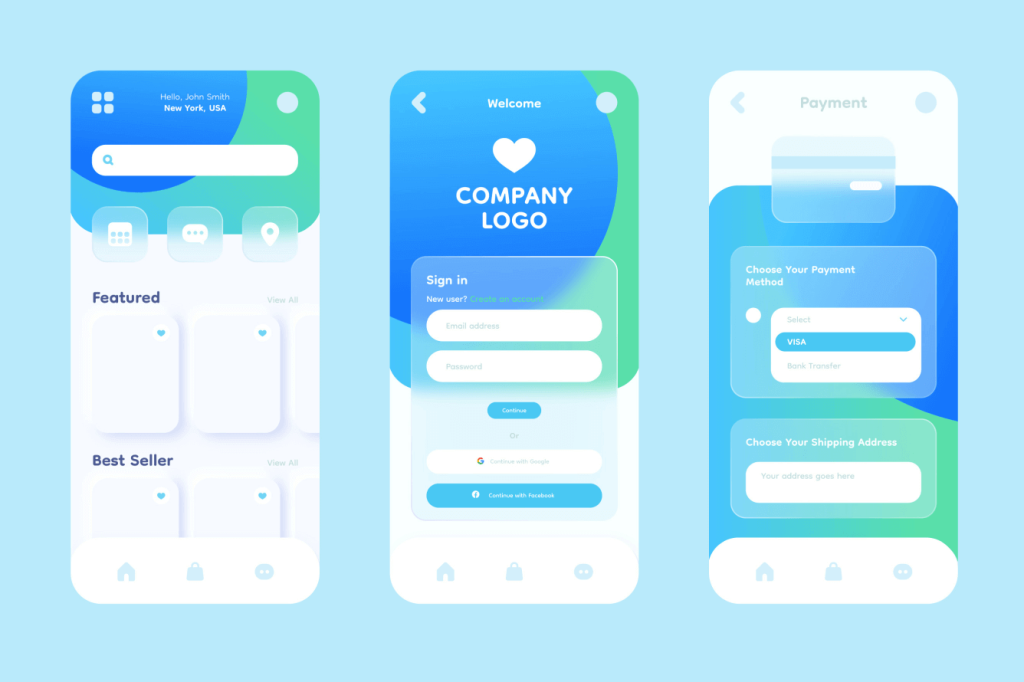
App design is the process of planning, structuring, testing, and creating the experience users have when interacting with a mobile, tablet, desktop, or web application. Modern app design combines user experience (UX), user interface (UI), business strategy, psychology, accessibility, and technology to create products that solve real problems efficiently.
The success of many well-known applications such as Airbnb, Uber, Spotify, Duolingo, and Notion stems not only from their features but from how effectively users can interact with those features. A powerful feature that users cannot find or understand creates little value. Effective app design bridges the gap between functionality and usability.
Today’s users have high expectations. Research from Google and Nielsen Norman Group consistently shows that users quickly abandon products that feel confusing, slow, or difficult to navigate. App design directly influences user retention, customer satisfaction, conversion rates, and long-term business growth.
Whether you are designing a startup MVP, an enterprise platform, a healthcare application, a fintech solution, or a marketplace app, the design process follows a similar foundation:
- Understand the problem.
- Research users.
- Define requirements.
- Structure information.
- Design interactions.
- Create interfaces.
- Test with users.
- Optimize continuously.
Understanding the Foundation of App Design
The foundation of app design helps you align user needs, business objectives, and product requirements before creating screens or features.
Many app projects fail because teams focus on interfaces before understanding the problem they are solving. A strong foundation reduces assumptions and creates clearer design decisions throughout the project.
The following elements help you define the direction and purpose of your app before moving into research and design.
Define the Problem Statement
A problem statement defines the specific user problem the app will solve. A clear problem statement aligns design, development, and business decisions, reduces feature creep, and ensures the product addresses a validated user need.
Identify the Target Audience
The target audience is the specific group of users the app is designed to serve. Understanding demographics, behaviors, goals, and expectations helps create relevant features, user flows, and experiences.
Establish Business Goals
Business goals define the measurable outcomes the app should achieve. Common goals include increasing revenue, improving retention, acquiring users, reducing costs, or increasing engagement through better product experiences.
Create a Clear Value Proposition
A value proposition explains why users should choose the app over alternatives. It communicates the primary benefit, target audience, and unique advantage while helping guide product positioning and feature prioritization.
Conduct User Research Before Designing
User research helps you understand your audience before investing time in app design and development.
Research reduces assumptions, uncovers user needs, and validates product decisions with evidence. The insights gathered during this stage influence everything from features and navigation to onboarding and conversion flows.
The following research methods help you build a stronger understanding of your users and market.
Market Research
Market research evaluates industry trends, customer expectations, and market opportunities.
It helps you validate demand, identify gaps, and understand the environment in which your app will compete.
Competitor Analysis
Competitor analysis examines similar products and user experiences within your market.
Reviewing competitors helps you identify strengths, weaknesses, and opportunities to create a better solution.
User Interviews
User interviews gather direct insights from people who may use your app.
These conversations reveal goals, frustrations, behaviors, and needs that often remain hidden in analytics data.
User Surveys
User surveys collect feedback from larger groups of users efficiently.
They help validate assumptions, identify patterns, and prioritize features using quantitative data.
Behavioral Analysis
Behavioral analysis examines how users interact with products and digital experiences.
Analytics, session recordings, and funnels reveal user actions, friction points, and opportunities for improvement.
Create User Personas
User personas transform research findings into realistic representations of your target users.
Personas help you design with specific users in mind rather than making assumptions. They also improve alignment across product, design, and development teams.
Demographic information describes characteristics such as age, occupation, location, and device preferences.
These details help you understand the context in which users interact with your app.
User goals represent the outcomes people want to achieve through your app.
Pain points are the obstacles that prevent users from achieving their goals efficiently.
Identifying and solving pain points improves usability and increases user satisfaction.
User motivations explain why people choose to engage with your app.
Motivations often influence behavior, feature adoption, engagement, and long-term retention.
Map User Journeys and User Flows
User journeys and user flows help you understand how people move through your app to complete tasks.
Mapping these experiences reveals friction points, improves usability, and creates more efficient interactions. Well-designed flows help users reach their goals with less effort.
The following mapping techniques help you structure the user experience before designing interfaces.
User Journey Mapping
User journey mapping visualizes the complete experience users have with your app.
It highlights goals, emotions, touchpoints, and opportunities for improving the overall experience.
User Flow Design
User flow design defines the sequence of actions users take to complete a task.
Clear flows reduce confusion and help users move efficiently through the application.
Conversion Flow Optimization
Conversion flow optimization improves the path leading to key actions such as signups, purchases, or bookings.
Reducing friction often increases completion rates and business results.
Onboarding Flow Design
Onboarding flow design introduces users to your app and its value.
Effective onboarding helps users understand key features and achieve their first success quickly.
Build the Information Architecture
Information architecture organizes your app’s content, features, and screens into a structure that users can understand easily.
A clear structure helps users find information quickly and complete tasks without confusion. Strong information architecture also supports scalability as your app grows and evolves.
Content hierarchy organizes information according to importance and user needs. Critical actions and information should appear first, helping users find relevant content quickly and efficiently.
Navigation structure determines how users move through the app. Clear, consistent navigation improves discoverability, reduces cognitive load, and supports efficient task completion.
Design App Wireframes
App Wireframes help you visualize layouts, user flows, and functionality before investing in detailed visual design.
Creating app wireframes early allows you to explore ideas, identify usability issues, and refine structures with minimal effort. They provide a blueprint for the user experience before app development begins.
Low-fidelity wireframes use simple sketches and placeholders to represent layouts and user flows.
Mid-fidelity wireframes add more structure, content placement, and interface detail.
High-fidelity wireframes closely resemble the final interface design.
Wireframing tools help you create and collaborate on interface concepts efficiently.
Popular options include Figma, Sketch, Balsamiq, Adobe XD, and Axure RP.
Create Interactive Prototypes
Interactive prototypes simulate how your app will function before development begins.
Prototypes help you test interactions, validate assumptions, and gather feedback using realistic user experiences. They reduce risk by identifying issues before code is written.
Clickable prototypes allow users to navigate between screens and interact with interface elements.
User testing prototypes help you observe how real users interact with proposed designs.
Validation techniques confirm whether your design effectively solves user problems.
Common methods include usability testing, moderated sessions, first-click testing, and prototype reviews.
Design the User Experience (UX)
User experience design focuses on helping users achieve their goals efficiently and enjoyably.
A strong UX reduces friction, improves usability, and increases satisfaction throughout the customer journey. Every interaction should support user needs while contributing to business objectives.
The following UX principles help create intuitive and user-centered experiences.
Usability Principles
Usability principles ensure users can learn and use your app effectively.
Key principles include clarity, consistency, efficiency, feedback, and error prevention.
Accessibility Standards
Accessibility standards ensure your app can be used by people with diverse abilities.
Following accessibility guidelines improves inclusivity, usability, and compliance.
Navigation Design
Navigation design helps users move through the app with confidence.
Clear labels, predictable structures, and simple pathways improve task completion and user satisfaction.
User Satisfaction Metrics
User satisfaction metrics measure how users perceive the experience.
Common metrics include CSAT, NPS, retention rate, and usability scores.
Design the User Interface (UI)
User interface design creates the visual layer that users interact with throughout your app.
A well-designed interface improves usability, strengthens brand consistency, and helps users focus on important actions. Every visual element should support both functionality and user experience.
The following UI components help create attractive and effective interfaces.
Color Systems
Color systems define how colors are used consistently throughout your app.
They support branding, visual hierarchy, accessibility, and user feedback across different interface states.
Typography
Typography controls how text is presented within the interface.
Consistent typography improves readability, establishes hierarchy, and enhances the overall user experience.
Visual Hierarchy
Visual hierarchy guides users toward the most important information and actions.
Elements such as size, spacing, contrast, and positioning help users process content efficiently.
Component Libraries
Component libraries contain reusable interface elements used throughout the app.
Reusable components improve consistency, speed up design workflows, and simplify development.
Design Systems
Design systems provide a unified framework for creating and maintaining interfaces.
They combine components, guidelines, patterns, and documentation to ensure consistency at scale.
Advanced App Design Features
Advanced app design features enhance functionality, engagement, and personalization beyond core experiences.
Not every app requires these capabilities, but the right features can improve usability, increase retention, and create stronger user experiences when aligned with user needs.
The following advanced features are commonly used in modern applications.
Dark Mode Design
Dark mode design provides an alternative interface using darker backgrounds and adjusted contrast.
It supports user preferences, improves visual comfort, and creates a more flexible experience.
AI-Powered Personalization
AI-powered personalization adapts content, recommendations, and experiences based on user behavior.
Personalized experiences can improve engagement, relevance, and long-term retention.
Gamification
Gamification uses rewards, achievements, progress indicators, and challenges to encourage participation.
When applied appropriately, it can increase motivation, engagement, and user loyalty.
Voice Interfaces
Voice interfaces allow users to interact with your app using spoken commands.
They improve accessibility and provide hands-free interactions in suitable use cases.
AR and VR Experiences
AR and VR experiences create immersive interactions through augmented or virtual environments.
These technologies are commonly used in retail, education, healthcare, training, and entertainment applications.
Real-Time Collaboration Features
Real-time collaboration features allow multiple users to interact simultaneously within the app.
They support teamwork, communication, and shared workflows through live updates and synchronized interactions.
Test Your App Design
App Testing helps you identify usability issues, validate design decisions, and improve the overall user experience before launch.
Even well-designed interfaces can contain friction points that affect engagement and conversions. Regular testing reduces risk and helps ensure your app meets user expectations.
The following testing methods provide valuable insights throughout the design process.
Usability Testing
Usability testing evaluates how easily users can complete tasks within your app.
Observing real users helps uncover confusion, friction points, and opportunities for improving the experience.
A/B Testing
A/B testing compares two design variations to determine which performs better.
It helps you make data-driven decisions based on user behavior rather than assumptions.
Accessibility Testing
Accessibility testing verifies that users with disabilities can use your app effectively.
Testing should include accessibility standards, assistive technologies, and inclusive interaction patterns.
Performance Testing
Performance testing measures how quickly and reliably your app responds to user actions.
Fast and stable experiences improve satisfaction, engagement, and retention.
Developer Handoff
Developer handoff ensures your designs are translated into functional products accurately and efficiently.
Clear communication between designers and developers reduces misunderstandings, prevents inconsistencies, and speeds up implementation. A structured handoff process helps maintain design quality throughout development.
The following elements support successful collaboration during implementation.
Design Specifications
App Design specifications provide detailed implementation requirements for developers.
They typically include dimensions, spacing, typography, colors, interactions, and responsive behaviors.
Component Documentation
App Component documentation explains how interface elements should behave and be used.
Well-documented components improve consistency and simplify development workflows.
Asset Management
App Asset management organizes design files, images, icons, and supporting resources.
Proper organization reduces errors and makes assets easier for developers to access and implement.
Design-to-Code Workflow
Design-to-code workflows connect design systems and development processes.
Shared tools, standards, and documentation help maintain consistency between design and implementation.
Launch and Optimize
Launching your app is the beginning of an ongoing improvement process rather than the final step.
User behavior, feedback, and performance data reveal opportunities to refine the experience after release. Continuous optimization helps your app remain competitive and valuable over time.
The following activities support successful post-launch growth and improvement.
Beta Testing
Beta testing releases the app to a limited audience before the public launch.
Early feedback helps identify issues, validate assumptions, and improve overall quality.
Analytics Setup
Analytics setup enables you to measure user behavior and product performance.
Tracking data helps identify trends, opportunities, and areas that require improvement.
KPI Monitoring
KPI monitoring evaluates whether your app is achieving its business and user objectives.
Common metrics include retention, engagement, conversions, revenue, and user satisfaction.
User Feedback Collection
User feedback collection gathers insights directly from customers.
Reviews, surveys, interviews, and support requests help identify recurring issues and improvement opportunities.
Continuous Improvement
Continuous improvement involves refining the app based on research, feedback, and performance data.
Regular updates help improve usability, accessibility, performance, and user satisfaction.
Common App Design Mistakes to Avoid
Many app design problems originate from avoidable mistakes made during planning, design, or testing.
Recognizing these issues early helps you create better user experiences, reduce development costs, and improve product performance. Avoiding common mistakes often has a greater impact than adding new features.
The following mistakes frequently affect app usability and success.
Ignoring User Research
Ignoring user research increases the risk of designing for assumptions instead of real needs.
Research helps you understand user goals, validate decisions, and build features that provide actual value.
Overcomplicated Navigation
Overcomplicated navigation makes it harder for users to find information and complete tasks.
Simple and predictable navigation structures improve usability and reduce frustration.
Poor Accessibility
Poor accessibility creates barriers for users with different abilities.
Following accessibility standards helps make your app more inclusive, usable, and compliant.
Inconsistent UI
Inconsistent UI creates confusion and weakens the overall user experience.
Using consistent patterns, components, and visual styles improves familiarity and trust.
Lack of Testing
Lack of testing allows usability issues and design flaws to reach production.
Regular testing helps identify problems early and supports continuous improvement.
Conclusion
Designing an app requires more than creating attractive screens. It involves understanding users, defining goals, structuring information, testing ideas, and continuously improving the experience.
By following a structured design process, you can reduce risk, improve usability, and create products that deliver value to both users and businesses.
The following takeaways, checklist, and next steps summarize the essential elements of successful app design.
Key Takeaways
Successful app design combines user research, strategy, UX, UI, testing, and optimization.
A user-centered approach helps you create experiences that solve real problems while supporting measurable business outcomes.
Next Steps for Designers
The next step is to apply these app design principles to your own project.
Start by defining the problem, understanding your users, and validating ideas before investing in development. A structured design process helps reduce risk, improve usability, and create products that support both user and business goals.
If you’re looking for expert support with UX design, UI design, wireframing, prototyping, design systems, or end-to-end product design, our team can help turn your ideas into user-centered digital experiences.
👉 Explore our App Design Services: [Insert App Design Services Link]
Learn how we help businesses design intuitive, scalable, and conversion-focused applications that users enjoy using.